What's New?
What's new in Version 4.8.4.1 (Released 22nd December 2020)
What's new in Version 4.8.4.0 (Released 8th December 2020)
- Added new
Prerequisite keyword that lets you trigger an update only if a
specified file exists. Optionally, a version number can be
specified, in which case the update is only triggered if the
existing file version is the same or newer. Used in
combination with CheckFileExists,
CheckFile, FileMD5 and
FileVersion keywords on an AND, AND, AND
basis.
What's new in Version 4.8.3.0 (Released 23rd October 2019)
What's new in Version 4.8.2.0 (Released 6th November 2017)
- The embedded manifest in the service executable,
WebUpdateSvc4.exe, has been upgraded to fully (re-)support the
'Application Mode' architecture of the Software Update Wizard.
This mode supports updating to folders the logged on user has full
rights to only, using the WebUpdateSvc4.exe file as a standard
executable and does not trigger UAC prompts. 'Application
mode' provides a solution for users who don't need to update
protected folders (such as Program Files) and who don't want the
low-footprint Windows service running all the time.
- We have analysed the implications of the Controlled Folder
Access feature introduced in Windows 10 Version 1709.
Currently the Software Update Wizard continues to run seamlessly and
with not required changes where Controlled Folder Access is enabled.
Please see
Controlled Folder
Access for more information.
What's new in Version 4.8.1.0 (Released 9th August 2017)
- Added new
SuperLogging keyword, which allows you to turn SuperLogging on
for the scope of the update section in which the
SuperLogging
keyword is found, overriding the global logging setting found in the
WebUpdateSvc4.ini settings file.
- New wuwinstaller.exe command line flag which forces the Software
Update Wizard service to be immediately updated - see
Deployment.
What's new in Version 4.8.0.1 (Released 9th January 2017)
What's new in Version 4.8.0.0 (Released 17th March 2015)
-
KillProcess keyword
re-engineered to allow the Software Update Wizard to close and restart 64
bit applications in exactly the same way as it has always worked on 32 bit
applications. (Note: A new, digitally signed DLL, 'killer.dll', is
installed into the same folder as the service executable by
wuwinstaller.exe. If 'killer.dll' is not
found or the host operating system is older than Windows Vista / Windows
Server 2008 then the original KillProcess method for closing running
applications will be used.)
- Added option to conserve user's bandwidth during update file download
with
Throttle.
- Added option to download the update file before the user is notified
that an update is available with
Predownload.
- The
subtitle text can now
be optionally left of center justified. The shadow can be switched
off, if required.
- The colour of the
subtitle text can now be defined using the new
SubTitleColor keyword.
- Added new keyword,
MessageBoxBoilerPlate, which lets you predefine an HTML template which
individual message boxes shown by the Software Update Wizard will use (i.e.
through the
Message=
and
FinalMessage= keywords
and standard notification messages). This is a fantastic way to get
the look and feel of the Software Update Wizard customised and standard
throughout.
What's new in Version 4.6.2.3 (Released 14th November 2013)
- Added ability to run
Powershell
scripts from commands, files and urls in
ExecAfter /
ExecBefore keyword lines.
This adds a lot of power to what is possible from the Software Update Wizard
because the functionality limit of the Software Update Wizard has become
what is achievable in Powershell.
- Added expansion variables "[YYYY]" and "[YY]" to
Title and
Subtitle keywords. At
runtime they expand into the 4-digit and 2-digit current year. Helps
to keep your copyright time range up to date!
- Added new
SetReg keyword to allow update scripts to write to the user's
Windows registry.
- If Internet Explorer is set to 'Work offline' the Software Update Wizard
now mimics modern Internet Explorer behaviour and switches to 'Work online'
to process each update web request, reverting to 'Work offline' on
completing each required download. Powerprogrammer feels this
behaviour is 'wrong' and that if the user requests 'Work offline' then the
software should not change it but as Internet Explorer works more or less
this way then, reluctantly, we have made the Software Update Wizard work
that way too.
What's new in Version 4.6.2.2 (Released 27th May 2013)
- Fixed
ExecAfter
<QuitOnFail> option so that if user cancels out of a UAC prompt the
non-running of the launched process causes the rest of the update section to
be skipped, as originally intended. (Previously <QuitOnFail> would
only cause the rest of the update section to be skipped if the process
actually returned a non-zero exit code.)
What's new in Version 4.6.2.0 (Released 4th March 2012)
- Added new
DelTreeAfterKillProcess keyword, which lets you delete a
folder tree immediately after the
KillProcess lines in the update script
have caused your application to close for update.
-
DelTree and
DelTreeAfterKillProcess have a new option flag,
<FilesOnly>,
which causes the files in the target nested folder structure to be deleted
without the folder structure itself being deleted.
- New
<QuitOnFail> option flag
added to
ExecAfter and
ExecBefore which causes the
update script to stop and return if the process launched by
ExecAfter or
ExecBefore returns a
non-zero error code. (Note: this flag only works when you also use the
<Wait=Yes> option flag.)
What's new in Version 4.6.1.0 (Released 15th May 2012)
- Added new
ServerTimeout
keyword to alter the default webserver timeout used for downloads by the
Software Update Wizard from the Microsoft default of 30 seconds.
What's new in Version 4.6.0.0 (Released 6th March 2012)
- The install locations for
wuw4.dll and
WuWUI.exe have been changed from the System32 folder to the Windows folder,
in order to support compatibility of the Software Update Wizard in
environments where the security policy does not permit user processes to
launch applications from the System32 folder. The service component,
WebUpdateSvc4.exe, stays in System32.
If you use
wuwinstaller.exe to install or update your
users' Software Update Wizard components you do not need to make any changes
to your application or any existing processes.
If you are 'rolling
your own' installer then you should change the registry key '
WuWUIFolder'
at
HKEY_LOCAL_MACHINE\SOFTWARE\Web Update
Wizard to the user's Windows folder.
What's new in Version 4.5.5.0 (Released 28th October 2011)
- Added new
FileMD5 keyword,
which lets you trigger an update if the MD5 of the file specified in the
Filename line is different to
the MD5 of the existing file on the user's computer.
- Added alternative MD5 test to
CheckFile keyword. Allows the MD5 of any existing file on the
user's computer to be compared with the MD5 specified in the
CheckFile line. An
update is triggered if the MD5s are different.
- Added alternative MD5 test to
AdditionalFile keyword.
Allows the MD5 of the file on the user's computer to be compared with the
MD5 specified in the
AdditionalFile line. The file specified in the
AdditionalFile line is
updated if the MD5s are different.
What's new in Version 4.5.4.2 (Released 13th October 2011)
-
<AllowPostpone> flag was
not saving postpone date correctly under Windows XP. Fixed.
What's new in Version 4.5.4.1 (Released 23rd June 2011)
-
Campaign Manager enhanced to support
multiple cycled URL launches from the campaign - i.e. the first time the
campaign is run launches page1.htm, the second time it launches page2.htm
etc.. When the last page in the campaign has been viewed you can get
the campaign to restart at page1.htm or else to finish.
What's new in Version 4.5.3.1 (Released 6th June 2011)
- Fixed Campaign Manager issue where end date for
campaign is set to >2038. (Bug in
Microsoft runtime routine for dates after 2038)!
What's new in Version 4.5.3.0 (Released 31st May 2011)
- Added some new
folder expansion
constants which make it much easier to specify folders relating to the
currently logged on user (which are different from their counterparts as
seen by the SYSTEM security context, in which the Windows service runs).
The relevant constants now have counterparts which start with "<USER:" so
you can be 100% sure which security identity's folder will be used.
So, even though most of the update actions are executed in the SYSTEM
context your script can still 'see' the logged on user's folders where
necessary.
What's new in Version 4.5.2.10 (Released 19th January 2011)
- Bugfix on wuw4.dll to resolve issue with dynamic loading of dll.
- If the update script exists but is empty no error message will now be
posted. This makes it easier to work with
dynamically generated update scripts. (The WebUpdateSvc4.log file
still reports the emptiness of the update script.)
What's new in Version 4.5.2.9 (Released 12th January 2011)
- Dialog box text warning that running application must be closed in order
to complete update modified to only show application name rather than full
command line (including folder path). Probably neater!
What's new in Version 4.5.2.8 (Released 7th January 2011)
- Download progress dialog does not appear in Task Bar. This makes
the download appear to being managed by your application.
What's new in Version 4.5.2.7 (Released 23rd July 2010)
- A couple of minor, cumulative fixes.
What's new in Version 4.5.2.5 (Released 29th March 2010)
What's new in Version 4.5.2.4 (Released 23rd March 2010)
- If you really, really do not want to install the Software Update Wizard
as a
Windows Service, are prepared to live with the limitations this
unavoidably causes and would prefer to use it in Application mode (see
architecture) then you can now deploy all the
Software Update Wizard component files into your application folder.
Previously WebUpdateSvc4.exe had to be deployed in System32.
What's new in Version 4.5.2.3 (Released 15th February 2010)
- Fix on crash using Software Update Wizard in '
[AsApp]'
mode.
What's new in Version 4.5.2.2 (Released 10th February 2010)
- Fixed working folder for
ExecBefore /
ExecAfter
keywords.
- Fixed licence registration where trial licence had already expired.
What's new in Version 4.5.2.0 (Released 25th January 2010)
- Added new
MessageBoxScale keyword which lets you change the default size of the
Software Update message boxes.
- Added new
<MessageBoxScale=x,y>
html 'pseudo-tag' which you can include in any message box texts to change
the size of the message box in which the html message is displayed.
- Added new command line flag for wuwinstaller.exe to suppress addition of
uninstaller into Control Panel / Add Remove Programs applet. (The
uninstaller executable is still created by wuwinstaller.exe and can be
called from your own uninstaller.)
See here for more information.
- Added some new image files you can use / adapt as bitmaps for the
Software Update Wizard message boxes. Check the 'Program Files\SoftwareUpdateWizard\Graphics'
folder to locate these images.
See here
for more information on customising the look and feel of the Software Update
Wizard message boxes.
What's new in Version 4.5.1.10 (Released 1st December 2009)
- Fixed a couple of issues in 2-pass updates:
- WebUpdateWait() would wait till the end of the timeout rather than
the end of the MODE=1 process. This is now fixed in an updated
version of wuw4.dll.
- The download progress dialog box would not appear during the MODE=2
process. This is now fixed in an updated version of wuwui.exe.
What's new in Version 4.5.1.8 (Maintenance Release 21st October 2009)
- Fixed missing 'Options' text on a message box with '<AllowPostpone>' tag
used on '
Importance='
keyword line.
What's new in Version 4.5.1.8 (Documentation Update 5th September 2009)
- Command line option added for wuwinstaller.exe, allowing automatic
registering of the service application in the SYSTEM security context to be
disabled.
See here for more
information.
What's new in Version 4.5.1.8 (released 3rd July 2009)
- Added the ability to locate the licence file, WebUpdateSvc4.LIC, in the
same folder as WebUpdateSvc4.exe (the Software Update Wizard Service
application) is running from, for applications that are running from a
networked location.
See
here.
What's new in Version 4.5.1.7 (released 15th June 2009)
- Added documentation on using the Software Update Wizard on 64 bit
versions of Windows.
See here for more
information.
- Tested the Software Update Wizard under Windows 7. No
incompatibilities found.
- Added "
<SW_HIDE>" flag to
ExecBefore and
ExecAfter keywords, which
allows suppression of command window when using these keywords to execute
console (DOS) type commands.
What's new in Version 4.5.1.6 (released 29th April 2009)
- Added new encryption option for keywords '
LoginAs'
and '
Password'. You can
now hide the authentication details in your script by entering them in
encrypted format. The
Software Update
Wizard Project Manager has a new 'Encrypt' button which allows you to
generate the encrypted syntax and copy it to the Windows clipboard for
pasting into your update script.
What's new in Version 4.5.1.5 (released 26th February 2009)
-
KillProcess
now successfully uses Windows WM_CLOSE message to cause running
applications to close elegantly wherever possible. TerminateProcess is
then used if the targeted application does not close within the specified
timeout period.
What's new in Version 4.5.1.3 (released 18th December 2008)
- Added
DialogTxt keyword to allow colour of progress messages in 'downloading' dialog box to be customised.
What's new in Version 4.5.1.2 (released 5th November 2008)
- Added "
<Backup>" switch to AdditionalFiles keyword to allow the file referred to in the
AdditionalFile line to be backed up prior to update.
What's new in Version 4.5.1.1 (released 23rd September 2008)
What's new in Version 4.5.1.0 (released 12th September 2008)
- Added "
<norestart>" option to
KillProcess
keyword in order to allow
KillProcess
to kill a running process without automatically restarting it after the update
process has completed.
What's new in Version 4.5.0.11 (released 10th September 2008)
- You can now read the WebUpdateSvc4.log file whilst it is being written to by the
update process (if you really want to!).
What's new in Version 4.5.0.10 (released 14th April 2008)
- Fix on language files. The 'downloading' dialog box now correctly displays
the download data using the language file strings.
What's new in Version 4.5.0.9 (released 5th March 2008)
- In
2-pass updates the xml file and saved
script file are no longer automatically deleted after the <MODE=2>
WebUpdate/WebUpdateWait call. This allows you
to issue separate <MODE=2> calls for each update group or update section
number and therefore provide better feedback about the updates being
processed to your users from your application's interface.
- Added the "<CLEANUP>" option flag to <MODE=2> updates in
2-pass mode. Appending this flag causes
the xml and saved script files from the <MODE=1> call to be deleted.
- Small modification to
wuw4.dll, which affects
2 pass updates only. When handling a
<MODE=1> url the WebUpdateWait() function now only returns when the xml file
exists and can be opened for reading by your application, or after the
WebUpdateWait() timeout, whichever is sooner.
What's new in Version 4.5.0.7 (released 21st January 2008)
Please note that with effect from Version 4.5.0.0 the Web Update Wizard has been
renamed the 'Software Update Wizard'. However, the names of the existing software
components have not changed, thereby assuring existing users full backwards compatibility
whilst also, hopefully, making sense to new users.
There are no changes to the terms and conditions of use of the product. All existing
customers are guaranteed that their rights to the software and future V4.x updates
are transferred fully to the Software Update Wizard without change or exception.
This release contains numerous new features:
-
Added keywords
PlatformMin and
PlatformMax to allow conditional updating based on
Windows platform.
- Added
<AllowPostpone> option to
Importance=Optional keyword to let the user choose the next date for being asked again for this update.
- Added
<AdditionalFiles> keyword to facilitate actioning multiple file updates
in a single update section. Each additional file can be version/date tested
and only updated if appropriate. An optional custom message text can be included
in the
Message= message box for each
additional file. Each file can by MD5 validated. See help topic for
AdditionalFile.
- The edit boxes in the
Project Manager Utility have
been replaced with history combo boxes. The combo-boxes now remember the last
25 entries in each field.
- New
2-pass update mode has been implemented, which lets your application handle
the user interface part of the update process where the Software Update Wizard establishes
which updates are available, passes your application an XML file containing the
available updates data, and then actions the updates in response to your application's
instruction.
Full information here...
- Some wifi authentication processes work by returning a web page based sign-on page
in response to the first http: request issued by the client. The Software
Update Wizard now ignores such pages instead of displaying syntax error message
boxes. (However, in this case no update will be processed unless your application
calls the Software Update Wizard a second time.)
- Corrected language locale detection for
Message,
ShortMessage and
LongMessage.
Note to existing users:
language code syntax is now: "
Message=<*0809*>This is the message text"
- Updated documentation on
ShowSystemTray
option. You
can also specify the title text of the bubble!
- The system tray bubble (if included in your script) now only appears
after
the update advisory dialog box. See
ShowSystemTray.
- In addition, you can now have separate bubbles for each update section. See
ShowSystemTray.
- Added option to change the default polling interval for updates.
See
PollInterval.
- Added
DelTree keyword
which lets your update script recursively delete a specified folder and
its descendants.
What's new in Version 4.1.0.11 (released 1st November 2007)
- Enhancement at customer suggestion! Added the "<noprogress>"
option to the
Zipfile keyword
in order to suppress display of the "Unzipping.." progress dialog.
What's new in Version 4.1.0.10 (released 1st November 2007)
- Fix on unzipping with '<noui>' option - unzipping now works correctly
with this option.
- Fix on KillProcess - when implemented as a service application the WM_CLOSE
would fail and the target process would always be terminated. The Web Update
Wizard now successfully sends WM_CLOSE messages via KillProcess.
What's new in Version 4.1.0.9 (released 24th October 2007)
- Fix on unzipping - if target file was read-only the unzip would fail. Now
the target file is set to read-write before unzipping.
What's new in Version 4.1.0.8 (released 15th October 2007)
- Fix - if folder in zip did not already exist on target computer Web Update
Wizard would crash. (N.b. this bug only affected V4.1.0.7.) This error has
been corrected.
What's new in Version 4.1.0.7 (released 14th September 2007)
- Improved handling of unzip in
Zipfile
keyword. The Software Update Wizard will now perform the following steps when expanding
a downloaded zip file update:
- Try to open all the files in target folder that are contained in the
zip, before unzipping anything, to confirm they are not opened exclusively
by any other process.
- If any of the files cannot be opened for exclusive writing then it
makes 9 more attempts at 1 second intervals.
- If any of the attempts succeed it goes straight to the unzipping with
no further delay and unzips the files in the zip.
- After the 10th unsuccessful attempt to get access to the all the target
files it posts a message box listing the problem files and lets the user
choose whether to try another 10 times or abort the update.
What's new in Version 4.1.0.6 (released 2nd July 2007)
- When registering your licence file the read-only file attribute is now set.
- New service install flags which let you run the Software Update Wizard service
under any user account.
See here.
- Software Update Wizard Project Manager can now use either WebUpdate() or WebUpdateWait()
for testing your scripts.
See here.
What's new in Version 4.1.0.4 (released 25th June 2007)
- Updated version of wuwinstaller.exe which fixes reported clash with specific
Group Policy settings in some instances.
- Added new command line flags '-I' and '-U' to
WebUpdateSvc4.exe,
which allow service to be installed and started ('-I') or stopped and uninstalled
('-U') from the Windows services database in a single call to WebUpdateSvc4.exe.
What's new in Version 4.1.0.2 (released 22nd June 2007)
- Added new
ScrollingLink
feature, which adds a scrolling link to the bottom edge of Software Update Wizard
message boxes.
- Fixed pipe error on message box texts greater than 4096 characters.
- Corrected - some releases of the Software Update Wizard executables and dlls
were not digitally signed. This has been rectified in the current release.
What's new in Version 4.1.0.1 (released 21st May 2007)
- Added ability for Software Update Wizard message boxes, which are normally displayed
with a topmost and centered window style to be dragged around the desktop.
In case the user needs to see something under the message box before dismissing
it.
What's new in Version 4.1.0.0 (released 18th May 2007)
- Added optional
scrolling link
to Software Update Wizard message boxes.
What's new in Version 4.0.0.13 (released 14th May 2007)
- Fixed crash where update script is completely empty.
What's new in Version 4.0.0.12 (released 27th April 2007)
- Fix on Campaign Manager script processing.
What's new in Version 4.0.0.11 (released 24th April 2007)
- Tweaked - reference to PowerProgrammer in Service name removed at customer
request.
What's new in Version 4.0.0.10 (released 10th April 2007)
- Fixed - Proxy server setting from Internet Explorer was being used even
if the checkbox on the Internet Explorer / Internet Settings dialog box was
unchecked (and the proxy server details were therefore greyed out). The proxy
server setting is only used now if the IE proxy server settings checkbox is
checked.
- Added - This version has been enhanced to allow use of the https: protocol
as well as http: in processing updates. An update script URL or Filename/Zipfile
keyword which starts with "https://" will now be transacted using
the https: protocol.
What's new in Version 4.0.0.9 (released 6th April 2007)
- Fixed -
language files were not being read into
user interface component (WuWUI.exe).
What's new in Version 4.0.0.8 (released 4th April 2007)
- Added - proxy server details reported in SuperLogging mode.
- Corrected - proxy server details were not being used when running in Application
mode.
- Corrected -
LastUpdate.xml was being
updated in Local Application data folder. It is now updated in the running
application's folder, as in previous versions of the Software Update Wizard.
What's new in Version 4.0.0.7 (released 30th March 2007)
- Several assorted fixes and improvements to situations where two or more
update requests are fired off from the calling application in immediate succession.
What's new in Version 4.0.0.5 (released 29th March 2007)
- Fixed Title and Subtitle custom fonts. The font is now set if specified
in the Title/Subtitle keyword lines.
- WebUpdateWait() function now waits until WuWUI.exe terminates before returning
control to the calling function.
- WuW3 scripts will now fully work in WuW4 - pipe character used for carriage
returns in WuW3 will automatically be replaced by "<p>" as
WuW4 interprets the update script. DialogTxt keyword which is removed from
WuW4 will not post a syntax error in WuW4.
- ShowSystemTray was briefly showing system tray icon / bubble when the update
script was being parsed, even if no update was available. This behaviour has
been corrected, and the system tray items are only displayed if an actual
update is taking place
What's new in Version 4.0.0.3 (released 28th March 2007)
What's new in Version 4.0.0.2 (released 26th March 2007)
-
Fixed silent uninstaller (wuwuninst.exe) failing in redistributable package
(wuwinstaller.exe).
- Fixed <CLIENTFOLDER> substitution error in ExecAfter/ExecBefore keywords.
- Small update to notes for
V3 to V4 upgraders
help page.
What's new in Version 4.0.0.0 (released 19th March 2007)
What's new in Version 3.0.0.29 (released 6th October 2006)
- The CheckFileExists keyword now has an optional "<NOT>"
option, allowing an update to be processed only if the specified file is NOT
on the target computer.
What's new in Version 3.0.0.28 (released 4th October 2006)
- The
SubmitForm option has been upgraded to now support
POST submissions, as well as GET submissions. To submit as a POST rather than
a GET, insert the optional text "<POST>" at the start of the URL, as in:
SubmitForm=<POST>http://mycompany.com/cgi-bin/formail.pl?Recipient=...
etc
What's new in Version 3.0.0.27 (released 18th July 2006)
- Fixed version checking logic when WebUpdateSvc.exe is called directly via
ShellExecute or equivalent, rather than through wuw.dll / wuwstub.exe.
What's new in Version 3.0.0.25 (released 17th July 2006)
- Fixed Campaign Manager dialog customisation to bring in line with update
dialogs. Improved LoginAs/Password error handling
What's new in Version 3.0.0.22 (released 2nd June 2006)
- Fixed problem where (rarely) the Software Update Wizard would restart 2 instances
of the application which has been updated.
What's new in Version 3.0.0.21b (released 1st June 2006)
- Fixed problem with wuw.dll where a folder was appended to the update script
URL to wuw.dll in a WebUpdate or WebUpdateWait function call. In other
words, the call 'WebUpdate("http://www.mycompany.com/update.txt|c:\somefolder");'
now works
as described in this documentation, and looks
for the WebUpdateSvc.LIC file in the folder 'c:\somefolder' rather than the
folder of the application which made the call to wuw.dll.
What's new in Version 3.0.0.21 (released 20th April 2006)
- Added "<nowarn>" option to
Reboot
keyword.
What's new in Version 3.0.0.20 (released 11th April 2006)
- When downloading a zip file of a certain size range the size of the file
being downloaded was not shown on the download progress dialog. This
error has been fixed.
- Added internationalisation for the progress window displayed whilst zip
files are being unzipped.
What's new in Version 3.0.0.17 (released 21st February 2006)
- Introduced small delay in
KillProcess
for when WM_CLOSE fails to close the target application and the TerminateProcess
API is launched instead. In certain rare circumstances, the Web Update
Wizard message box saying that the application was still open and needs to
be closed manually would appear, even though KillProcess had successfully
(i.e. just) terminated the application.
- Small changes to a couple of the Software Update Wizard standard messages to
hopefully make them clearer / better presented.
What's new in Version 3.0.0.16 (released 31st January 2006)
- Fixed crash when using
Zipfile
keyword and one of the target files on the user's computer is read-only /
hidden. The Software Update Wizard will now change the attribute and successfully
unzip the updated file.
- Fixed crash when using
Filename
keyword and target file on the user's computer had the hidden file attribute
set. The Software Update Wizard will now change the attribute and successfully
update the target file.
What's new in Version 3.0.0.15 (released 13th January 2006)
- Enhanced
Bitmap and
Icon keywords so that they can use image files located on remote (i.e.
internet) web servers.
What's new in Version 3.0.0.14 (released 12th January 2006)
- Added a progress bar to show progress while downloaded zip file is being
unzipped by the Software Update Wizard. Affects Zipfile= keyword only.
What's new in Version 3.0.0.13 (released 22 December 2005)
- Inserted a pesky space into the "x% of file downloaded" title bar text on
the download dialog.
What's new in Version 3.0.0.12 (released 30 November 2005)
- The LastUpdate.xml file is now written
before the UsageCounter registry
value at "HKEY_LOCAL_MACHINE\SOFTWARE\\WUW" is incremented. This seems
a more correct order.
- Some documentation corrections and additions.
What's new in Version 3.0.0.11 (released 29 September 2005)
- The Software Update Wizard now uses the Internet Explorer proxy server settings
when running in Windows service mode, as well as in standard application mode.
(Previously in service mode it used the Local Service proxy server settings,
which may be different to the logged on user's settings.)
What's new in Version 3.0.0.10 (released 3 August 2005)
- Changed behaviour when the script file contains syntax errors. Now,
only one message box is posted for a script block containing multiple syntax
errors, which reports all the errors found in the script block. In addition,
the syntax errors are now written to the WebUpdateSvc.log log file.
What's new in Version 3.0.0.9 (released 1 July 2005)
- A small correction to the change introduced in 3.0.0.7, based on user feedback.
The Web Update
Wizard message boxes go back to being forced topmost as before 3.0.0.7, but
the download progress dialog
can be demoted in the active window z-order.
Hopefully this
is the most sensible option, and we can stick with it!
What's new in Version 3.0.0.8 (released 22 June 2005)
- Fix to allow VERY long update script files.
What's new in Version 3.0.0.7 (released 22 June 2005)
- Removed the wndTopMost flag from the Z-order window placement properties
of Software Update Wizard dialogs and message boxes, so that they are brought to
the front on display, but other windows can be subsequently be brought in
front if required. This allows the user to continue computing whilst
the update is being made.
What's new in Version 3.0.0.6 (released 10 June 2005)
- This is an update to the
LastUpdate.xml file which was added in
3.0.0.5 and addresses the concerns of some users. The creation of
LastUpdate.xml is now optional, and you
can now choose what information is updated into it.
Click the link for more information.
What's new in Version 3.0.0.5 (released 8 June 2005)
- The registry key "
HKEY_LOCAL_MACHINE\SOFTWARE\WUW\UsageCounter"
used by the
WebUpdateWait() function
is now created upon installation of the Software Update Wizard, rather than the
first time an update script is processed.
This makes it easier for users who want to directly interrogate this value
from their application as otherwise they would have to program around the
registry key not being created until AFTER the first run of the Web Update
Wizard on the target machine.
The key is now created by WebUpdateSvc.exe the first time it is executed,
including when WebUpdateSvc.exe is registered with Windows as a Windows service.
Even on Windows 9x, the wuwinstaller.exe will try to install the service and
silently fail on this task (because Windows 9x does not support service applications)
- which means that the registry key will be created by WebUpdateSvc.exe as
it tries (and fails) to install itself as a service.
Therefore, the only occasion when the key will
not be automatically
created for you is now:
- When you are not using our wuwinstaller.exe client installer program...
- ... and the user's operating system is Windows 9x
- A new XML file,
LastUpdate.xml, is created in your
application folder after each call to the Software Update Wizard, which lets your
application more easily evaluate whether the user was connected to the internet,
whether an update was made and whether the update completed successfully.
What's new in Version 3.0.0.4 (released 1 June 2005)
- Oops - 2 releases in 2 days - sorry!
Not good, but at least it proves we fix problems
quickly!
- Fix: font override in
Title and
SubTitle keywords in 'empty'
script blocks (i.e. the block [99999] which tells the user they already have
the most up to date version) now works correctly.
- Fix: Integrated Windows Authentication now works properly when using
LoginAs and
Password keywords.
- Enhancement: Added the
RunAlways keyword, which causes
a script block to be processed always, irrespective of the value of the
counter
variable in the script. This makes it possible to have a single script
block and to process the updates based on a comparison between the file version
number on the user's computer and a specified (new) version number in the
script file, using the
CheckFile
or
FileVersion keyword options.
What's new in Version 3.0.0.3 (released 31 May 2005)
- All processes launched from the Software Update Wizard by
KillProcess,
WindowTitle,
ExecBefore and
ExecAfter are now launched with
the working folder of your running application (i.e. equivalent to the <CLIENTFOLDER>
folder substitution variable).
Previously the working folder of WebUpdateSvc.exe was used.
What's new in Version 3.0.0.2 (released 19 May 2005)
- Normally you must install the Software Update Wizard licence file, WebUpdateSvc.LIC,
into the same folder as your running application. However, some users
have asked for the ability to install it into a different folder.
This update optionally lets
you install your licence file (WebUpdateSvc.LIC) into different folder to
your running application. The URL you pass to WebUpdate() can now have
the local path of the licence file appended to the script URL.
- For example, say the licence file is stored in the folder 'c:\Program Files\MyApp\LicenceFolder':
WebUpdate("http://www.mycompany.com/updatescript.txt|c:\Program
Files\MyApp\LicenceFolder");
- The folder path is appended to the update script URL and separated with
a '|' character (ASCII character decimal 124 / hex 7C).
- However - please note that if you use this option the default update
folder (i.e. if you do not use a
TargetFolder keyword) will
be the folder you specified for the licence file.
Also the <CLIENTFOLDER> folder substitution
variable will return the folder you specified for the licence file.
- Fixed problem with WebUpdateWait() function in wuw.dll. It was needlessly
trying to create the registry counter key when all it needed to do is open
it for reading. WebUpdateSvc.exe actually creates the key.
What's new in Version 3.0.0.0 (released 2nd May 2005)
- Improved, clearer and better structured documentation. Virtually totally
rewritten, with a view to making the product more accessible and easier to
learn. Please
send
us feedback if you are unhappy with any of the documentation or have any
suggestions to make it clearer.
- The '
Software Update Wizard Named Pipe Test Utility'
has been renamed 'Software Update Wizard Project Manager' and can now be used as
a proper 'front end- tool for preparing update scripts / uploading them to
your server. It has been given significantly upgraded features, such as the
ability to start and stop the Software Update Wizard service, launch editing of
script files, ftp uploads of scripts / update files etc.. In prior versions
this utility communicated directly with the Software Update Wizard service through
a named pipe but from V3 forward it uses the recommended mechanism for communicating
with the Software Update Wizard - i.e. via a WebUpdate() call to the
wuw.dll Dynamic Link Library.
- Common binary implemented. WebUpdateSvc.exe can now be installed as
a Windows Service, or can operate as wuw.exe in earlier versions - i.e. as
a standard Windows executable, passing the URL of the server update script
as an argument in the command line in a
ShellExecute() API or equivalent call.. (N.b. When
installed as a Windows Service, WebUpdateSvc.exe is able to operate in the
SYSTEM security context, allowing you to update files in folders such as Program
Files which the logged on user may not have rights to. When launched
with a
ShellExecute()
API or equivalent call and a script URL WebUpdateSvc.exe operates
exclusively in the logged on user's security context). Wuw.exe is
no more!
(When calling WebUpdateSvc.exe directly using
ShellExecute(), we recommend you use SW_HIDE as the display argument in
order to suppress display of the Software Update Wizard console window.
The Software Update Wizard interaction dialogs will still
display as normal).
-
Full multi-language support added. All
interactions with user can now be customised via language files. If
a language file matching the Windows language setting is not available then
the Software Update Wizard looks for a default language file (which you can provide).
If no default language file is found then the Software Update Wizard reverts to
(PowerProgrammer) English.
- Added
KillProcess keyword,
a more powerful and reliable way (than
WindowTitle ) of closing specified
running applications prior to updating them and then restarting them once
the updated version has been written to disc.
- The Software Update Wizard in Windows Service mode now works properly through
corporate proxy servers, providing the logged on user already authenticates
with the proxy server via their Internet Explorer proxy server settings.
Previously http requests were launched in the SYSTEM security context, which
meant that they were unable to authenticate with corporate proxy servers.
- Added
Software Update Wizard clipbook / syntax
definitions for popular
Textpad (shareware) and
PSPad (freeware) text editors. Tip:
PSPad uses IDE-type code completion / boilerplates more effectively for the
Software Update Wizard:
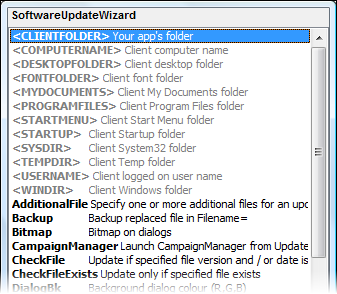
-
Important change! The Software Update Wizard licence file, WebUpdateSvc.LIC,
must now be located in your application's folder in order for the Web Update
Wizard to find it. In other words the licence file must be in the same folder
as the application which calls the Software Update Wizard is running from.
In addition, Software Update Wizard licence files are now personalised to your
software company. Registered users are provided with a serial number which
converts their licence to a registered version.
- Software Update Wizard dialogs now use XP style buttons where applicable.
- Fix: previous versions of the Software Update Wizard issued 2 requests to the
target web server for each URL requested, although the actual file was only
downloaded once. The first request was to test that the file was reachable
/ existed, and the second request was issued to initiate the actual download.
This behaviour was causing 2 entries to appear in the web server log files
for each request, although the file was indeed only downloaded once.
This is fixed in V3.0.0.0 - there is one request only for each URL.
Apologies to any customers who previously reported this behaviour - it took
much research to pin down and eliminate!
- Added: You can change the font name and height of the fonts used for the
Software Update Wizard dialog title panels. See the keyword help for
Title= and
Subtitle=.
What's new in Version 2.8.0.0 - (released 1st March 2005)
-
Wuw.dll can now, optionally, interoperate synchronously
with your application. In other words, it will only return control to
your program once the Software Update Wizard has finished its update check / update,
or after a specified timeout. This option is available by using the
new WebUpdateWait(URL, TimeOut) exported function. To work asynchronously
(as previously) just keep using the WebUpdate(URL) exported function.
What's new in Version 2.7.0.3 - (released 7th February 2005)
What's new in Version 2.7.0.2 - (released 3rd February 2005)
- Small bug fix on CheckFile / CheckVersion keywords. Only affects Windows
98 clients.
What's new in Version 2.7.0.1 - (released 31st January 2005)
- Fixed some dratted broken links in the help file! Why do some
wysiwyg
web page editors insist on expanding urls to a full local path? Must
upgrade to notepad for my web pages!
What's new in Version 2.7.0.0 - (released 27th January 2005)
- Added several new folder substitution constants. You can now substitute
the user's 'My Documents', Start Menu folder, Startup folder, Windows fonts
folder and desktop folder, as well as the existing Windows, temp, system and
Program
Files folders in the keywords
TargetFolder=,
ExecBefore=,
ExecAfter=,
Bitmap=,
Icon= and
CheckFile=.
What's new in Version 2.6.0.0 - (released 15th January 2005)
- Added
LoginAs= and
Password= keywords, which let you
specify authentication details where your update file resides in a password
protected web server folder. You can either 'hard code' the details
in your script or refer to a pair of specified registry keys on the user's
PC. See the
keywords section for more information.
What's new in Version 2.5.0.6 - (released 13th January 2005)
- Another cursed small bug fixed!
What's new in Version 2.5.0.4 - (released 31st December 2004)
- This is just a small maintenance release which fixes a bug reported by a
customer.
What's new in Version 2.5.0.3 - (released 10th December 2004)
- Added new keyword to update script options: '
CampaignManager= ', which
allows you to launch
campaign manager scripts
directly from your update script.
- WuwStub.exe now returns 0 to calling process if URL successfully passed to
Software Update Wizard service application, else non-zero if the call failed(because
the service named pipe is busy or not running).
What's new in Version 2.5.0.2 - (released 1st November 2004)
- Addition of CheckFileExists keyword - allows you to specify that an update
script section should processed only if one or more specified files already
exist
on the user's computer.
What's new in version 2.5.0.1? - (released 5th October 2004)
- Sometimes someone makes a suggestion that is simple to implement, but which
adds potentially lots of benefit to the product, and this point release contains
one of these. We have added a new keyword - '
IniSectionID= ', which lets
you determine the
INI file section label used to
keep track on the user's PC of the updates processed. The result is that you
can use PHP/ASP to dynamically create the server update script files for the
Software Update Wizard on your server. You application can pass through PHP/ASP
URLs which contain parameters to the Software Update Wizard, which then submits
it to your server using http in the normal way. Your server can then generate
the script and return it to the Software Update Wizard for processing. The benefit
is that this lets your server receive and react to information about which
customers are updating etc..
Please click this
link for more information.
What's new in version 2.5.0.0? - (released 4th October 2004)
- Addition of
Campaign Manager module -
the ability to use the Software Update Wizard to manage a marketing campaign launched
from your application via the Software Update Wizard. This functionality is completely
separate from the software update functionality offered by the Web Update
Wizard, but works in a very similar way - i.e. you provide a server script
file, you launch the Software Update Wizard with its URL, the Software Update Wizard
parses the file, determines whether it is a software update or campaign manager
type script and proceeds accordingly.
- Removed the previous restriction that the update files had to be on the
same server as the Software Update Wizard server script. Updated the
documentation
for '
Filename= ' and '
Zipfile= '.
- If no '
Subtitle= ' text is
provided then no subtitle will be shown on the Software Update Wizard dialogs.
Previously the text "� PowerProgrammer 2002-2004' would be shown.
- Service now has a proper 'Description' in the Windows service control snapin/applet.
(Well, every little helps!)
- Further revisions on help files - fixing a few broken internal links.
What's new in Version 2.4.0.6? - (released 16 September 2004)
- Updated help files. Hopefully we have made them clearer! Special focus on
clarifying the
architectural options
- i.e. using the
Windows
Service implementation
of the Software Update Wizard versus the
standard Exe version.
- Removed the requirement to pass the 'http://' part of the server script URL
through to the Software Update Wizard components from your application. Everything
now works either way - i.e.'http://www.mycompany.com/script.txt' and
'www.mycompany.com/script.txt'
both work.
What's new in Version 2.4? - (released 24 March 2004)
- Added ability to skip processing of one or more subsequent update blocks
if user declines an optional update. See enhanced documentation of
Importance=
keyword for more information and examples.
What's new in Version 2.3? - (released 13 February 2004)
- Enhanced the Named Pipe Test Utility (WebUpdateSCP.exe) to:
- Remember the last URL tested
- Open the WebUpdateSvc.ini file for viewing or editing
- Open the WebUpdateLog.log file for viewing or editing
- Added new keyword -
CheckFile. This keyword lets you
specify a file, a file version number and / or a file date/time stamp. If
the file does not exist on the user's PC, or the file version on the user's
PC is older than the version specified, or the date/time stamp of the file
on the user's PC is older than that specified in the
CheckFile line, then the script
block will be processed, otherwise it will be bypassed.
- Fixed bug on
MoveFileEx=
keyword processing in line with Microsoft Knowledge Base Article - 202071
(
http://support.microsoft.com/default.aspx?scid=kb;en-us;q202071
). Unfortunately Microsoft's documentation of the MoveFileEx API function
leaves one critical item out! (See
http://msdn.microsoft.com/library/default.asp?url=/library/en-us/fileio/base/movefileex.asp.)
- Fixed incorrect handling of version strings where the string contains spaces
between commas or full stops.
- Developer Installer installs the Software Update Wizard service app (WebUpdateSvc.exe)
and licence file (Web Update Service.LIC) into the Windows/System32 folder.
Previous versions installed these files into the Program Files folder for
the Software Update Wizard. This change brings the Developer Installer into line
with the Client Installer program, wuwNTClient.exe, supplied with the product,
and hopefully makes testing your scripts easier.
Software Update Wizard - Version 2.2 What's New
- Enhanced '
WindowTitle= ' keyword to more
effectively deal with applications which do not respond to WM_CLOSE window
messages. If the application has not closed down within a default period
of 5 seconds in response to receiving its WM_CLOSE message the Web Update
Wizard will forcibly close it down. You can control the period between
WM_CLOSE and forcible closure using the "<Timeout=xxx>" option - see
the
keyword reference section
for more information. (Prior versions just issued WM_CLOSE messages
without following up with a forced closure in the event of the target window
failing to respond to the message.)
- Enhanced the '
ExecBefore= ' and '
ExecAfter= ' keywords to allow
you to (optionally) specify / limit which operating systems the command should
be run on. Append the option "<MaxVer=x,x,x>" or "<MinVer=x,x,x>"
to the keyword line for this additional level of control.
- Added "<BlockDone>" option to the '
ExecAfter= ' keyword. This
ensures that the Software Update Wizard counter is incremented even if the '
ExecAfter=
' keyword uses the "<Wait=Yes>" option and the launched process triggers
a reboot. In this situation earlier versions of the Software Update Wizard
would not have incremented the counter. (See the
keyword reference section for
more information.)
- Fixed bug on "
MoveFileEx= " option for Windows
9x platforms. This option was previously failing under Windows 9x.
- Downloads greater than around 5.5Mb were failing on Windows 98. All
other operating systems and downloads less than 5.5Mbwere unaffected.
This bug appears to be related to a problem with multiple uses of the Microsoft
realloc() C runtime library routine. Version 2.2 works around this issue
by eliminatingrealloc() calls and therefore resolves this issue.
-
Log file detail
increased.
Software Update Wizard - Version 2.0 What's New
- Replaced the ActiveX component in V1 with a simple
32-bit Windows dll which performs the same function.
The dll does not need registering in the Windows registry and exports just
one function -
WebUpdate(URL of server update script
as a string).
- Dialogs totally changed and (hopefully) vastly more attractive to users.
-
Dialog colours, title text, icon and bitmap can now
be customised and 'branded' to your own product.
- Windows 9x and Windows NT or later version now uses 99% common code and
is compiled from the same code base. The Windows 9x version has been renamed
WuW.exe due to Windows 9x's restrictions
on replacing in-use files via the (antiquated) wininit.ini route.
- Suppressed display of download dialog when the service downloads the script
from the server.
- Added (optional)
SubmitForm keyword to simulate
a web browser form post, including spoofing the referring page. Use to transparently
send message to software house from the Software Update Wizard that an update was
completed on a user's machine.
- Added user defined
substitution variables for
SubmitForm, so that registry values (text strings) can be transmitted with
the SubmitForm syntax.
- Added (optional)
FileDate and
FileVersion keywords, to save
downloading update files which are newer on the client PC. Update only
occurs if version for download is newer than version on user's machine.
- Fixed bugs on dropped connections where the
ExecAfters ran anyway (they don't
now) and where the update was incorrectly logged as successful (it isn't now).
- Added
Reboot keyword to reboot
computer as last item in process.
- Added
MoveFileEx keyword,
which allows you to replace in-use files at next reboot.
- Added
NoSuccessMessage keyword
which, if included, prevents the 'xxx was successfully downloaded..' message
box at the end of the download.
- Added <NOWARN> option which suppresses the "I'm going to close xxx"
warning for the
WindowTitle keyword - e.g. "WindowTitle=Your
Application<NOWARN>" will close 'Your Application' without popping up
a warning box.
- Added
FinalMessage keyword
which lets you post your own success message instead of the Software Update Wizard
success message. Shows after everything else has finished but before (optional)
reboot.
-
FinalMessage and
Message keywords can now expand
carriage returns - use a '|' character in the message as a newline character.
- The
NT Service has always received the folder
containing the exe which contains the ActiveX component of Software Update Wizard.
Windows 9x users now now get this information too - the Software Update Wizard
sees the current folder as the one which contains the wuw.exe component.
- Added <CLIENTFOLDER> as a constant to
TargetFolder,
ExecBefore,
ExecAfter - it expands to the
folder hosting
wuw.exe for Windows 9x and the folder hosting
the application which calls the Software Update Wizard dll (
wuw.dll
) for the
NT Service version.
- Enhanced the
wuw.dll DLL so that it knows whether
to call the Software Update Wizard Service if running on NT or later or the
WuW.exe if on Win 9x. Therefore it
is now possible to create a 'one size fits all' installation program for the
Software Update Wizard functionality.
- Added <TEMPDIR> and <COMPUTERNAME> to list of constants that
ExecBefore /
ExecAfter can expand.
- Added <PROGRAMFILES>, <WINDIR> and <SYSDIR> to list of
constants that
TargetFolder can expand.
- Enabled a
user defined
message for situations when the client user already has the most up to
date versions of the software - simply append a block at the end of the server
script with a counter value larger than any used in the script (e.g. "[99999]")
and use the "Message=" keyword to have your user-defined message displayed.
- For Windows NT/2000/XP platforms,
ExecBefore and
ExecAfter processes launched within
SYSTEM security context unless "<AsUser>" is appended to their keyword
lines, where the launched process runs in the security context of the logged
on user. (In V1 all processes where launched in the SYSTEM security context.)