The default language of the Software Update Wizard is English. 'Out of the box', you can provide your own Message and FinalMessage text, but you are limited to a single language.
However, it is possible to fully localise the Software Update Wizard so that all dialog boxes and prompts are in the language of the logged on user. This section shows you how to achieve this.
In addition, if you are simply interested in 'improving' the in-built English prompts, you will find this section of help.
There are 2 elements to language localisation:
The Software Update Wizard solves the first element by allowing you to provide any number of additional language files with your Software Update Wizard installation.
Each time the Software Update Wizard is called it checks the Windows Regional Settings for the current language on the user's computer. If it finds a language file matching the Regional Settings language on the user's computer it loads and uses this. If it cannot find the specific language for that user, it then checks whether the installation has a default language file. If it exists it loads and uses this. If a default language file cannot be found the Software Update Wizard continues with 'PowerProgrammer English' (i.e. the built-in strings).
The second element, Message and FinalMessage text, is solved by providing separate Message and FinalMessage keyword lines in your script file - one for each specific language you wish to support (plus a default language).
Language files allow you to offer all Software Update Wizard interactions in the language of the logged on user.
The Software Update Wizard uses the Windows GetLocaleInfo API to obtain the Locale ID of the logged on user on the host computer. GetLocaleInfo returns an IS string containing the Locale ID of the language. The list of Locale IDs is here, or you can link to the latest list according to Microsoft here . (Use the column headed "LCID Hex".)
The Software Update Wizard then looks for a language file name built by combining the Locale ID and the folder your application is running from. For example, if the host computer is running "English_United_States" GetLocaleInfo returns "0409" as the hex locale ID. If your application is running from the folder "C:\Program Files\MyApp" then the Software Update Wizard will look for the language file: "C:\Program Files\MyApp\0409.tab". If this file exists the Software Update Wizard loads it and uses the language strings from the file in place of the built in strings.
If it cannot find this file, it then looks for the file "deflang.tab" in your application's folder. If it exists it loads it and uses the language strings from the file in place of the built in strings.
If "deflang.tab" does not exist, it uses the existing, built-in strings (i.e. 'PowerProgrammer English').
Note that if you have implemented the option of installing the Software Update Wizard licence file (WebUpdateSvc4.lic) in any folder other than the your running application then the Software Update Wizard will search for language files in that location too, and not the folder of your running application.
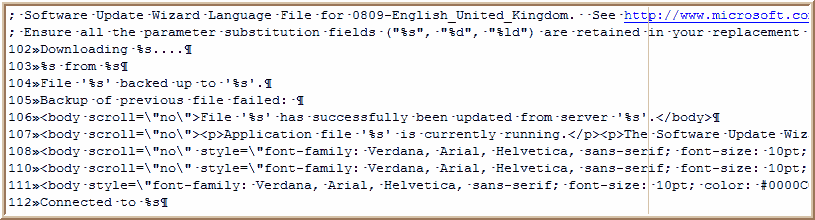
Software Update Wizard language files are tab delimited text files, where the first field is the string ID which identifies the string to the Software Update Wizard at run time and the second field is the actual string which will be displayed.
We have included a sample language file in the 'Languages' subfolder of your Software Update Wizard installation folder, 'deflang.tab', which you can use as a template for your own language file. If you have installed the Software Update Wizard into the default installation path, 'C:\Program Files\SoftwareUpdateWizard\Languages' you should be able to open this file for editing by clicking on this link.
Here is a snippet from a language file:
Key points to note:
That is all that is required to language localise the Software Update Wizard. In summary:
You can ascertain whether a language file has been used to process a script by inspecting the WebUpdateSvc4.log log file, which you will find in the same folder as WebUpdateSvc4.exe. (Note: a log entry is only made if a language file is actually used!)
You can provide language specific Message and FinalMessage text by prepending your messages with the localeID of the language concerned, as shown in this example:
[5]
Filename=http://www.mycompany.com/updates/MyApp.exe
Message=Hello <USERNAME>,<p>Would you like this update?
Message=<*040c*>Bonjour
<USERNAME>,<p>Vous aiment cette mise à jour?
Message=<*0407*>Guten
tag <USERNAME><p>Wurde Sie mögen dieses Update?
Importance=Optional
FinalMessage=Finished! Have a nice day!
FinalMessage=<*040c*>Fini!
Ayez un beau jour!
FinalMessage=<*0407*>Beendet!
Haben Sie einen schönen Tag!
(N.b. translations provided by Google!)
The first "Message=" line is the default message, which will be displayed if no subsequent language match against the user's language is found.
The second and third "Message=" lines provide language localised messages for user who's language locale is "<*040c*>" (French Standard) and "<*0407*>" (German Standard).
The order of the "Message=" lines is not significant. You can put the default message at any place in the script.
The same applies to the "FinalMessage" lines. That is, to provide a language specific message, start the message with the locale ID enclosed in 'chevron' and asterisk characters:
FinalMessage=<*0407*>Beendet! Haben Sie einen schönen Tag!