Architecture of the Software Update Wizard
Web Server
The Software Update Wizard works with any web server. It simply launches
http: requests against the server. All processing is done at the client end.
Therefore, the server does not need cgi, asp, php or any other type of server side
processing.
(However, it is possible to dynamically generate
the update scripts on the server using PHP / ASP etc..)
Client PC
There are 2 alternative options for delivering updates on the client PC:
- Installing and using the Software Update Wizard 'server' application, WebUpdateSvc4.exe,
as a Windows Service.
- Using the Software Update Wizard component, WebUpdateSvc4.exe, as a simple
Windows application.
 More..
Option (1) is compatible with all Windows operating systems from Windows
2000 onwards (i.e. not Windows 98ME) and is a requirement
for Windows Vista and later, or any user environment where the logged on user does not
have rights to 'Program Files' and other secured folder locations.
Here, the WebUpdateSvc4.exe component is installed as a Windows Service application,
runs in the background at all times, and operates in the SYSTEM security context.
The SYSTEM security context is analogous to Administrator mode, and it is therefore
able to update files in locations which the logged on user cannot. Under Vista and later,
where even an Administrator would be prompted by User Account Control
(UAC) the Software Update Wizard is able to update files without UAC
prompts appearing.
The memory overhead of the Software Update Wizard service is from 2.5 to
5Mb of RAM.
Option (2) only loads the WebUpdateSvc4.exe application whenever an update
check is initiated from your application and therefore has zero ongoing memory
requirement. However, on Vista or later, or tied down XP/2000 desktops it will not work,
because, launched from your application it inherits the same security context
your application is running under - i.e. the logged on user.
Therefore our recommendation is to use option (1), the Windows service option,
which over time is likely to become the only viable option for providing automatic
updates in any case.
As an application developer, you can initiate an update check using either a call
to the supplied wuw4.dll Dynamic Link Library (DLL) or you can launch the supplied
wuwstub.exe applet using the ShellExecute() Windows
API function or equivalent. Either way, you pass the URL of the Software Update
Wizard update script to wuw4.dll or wuwstub.exe. From then on the Software
Update Wizard components take over and check for / install updates, whilst your
application is free to continue processing. (Alternatively, you can let your
application wait until the update check has completed, using an alternate exported
function from the wuw4.dll).
Service implementation of the Software Update Wizard
(recommended)
Here is how the Software Update Wizard operates when it is running as a Windows
Service. Click here to jump down the page to a description
of it running as an application which is launched from your own running application.
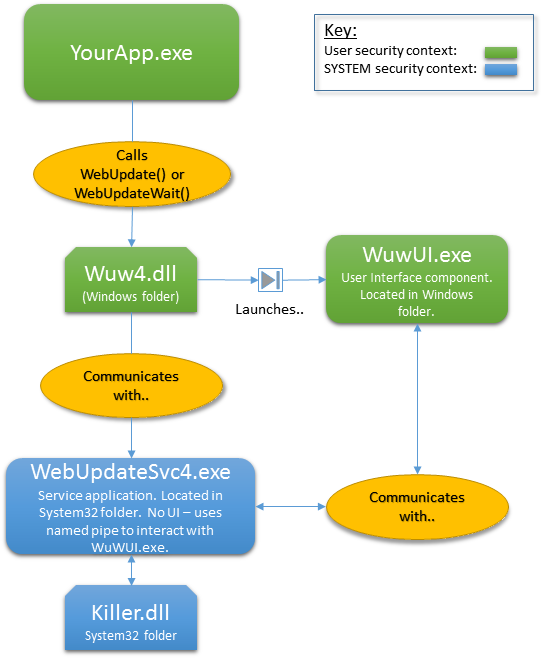
The Software Update Wizard components work cooperatively, as shown in the following
diagram:
Therefore,
- Your application calls one of the exported functions from wuw4.dll, passing
the url of the update script as an argument - for example
WebUpdate("http://www.mycompany.com/updates/updatescript.txt")
- WuW4.dll then launches WuWUI.exe, the user interface component. WuWUI.exe
therefore runs in the same security context as your application. The wuw4.dll
WebUpdate() function also sends the URL of the update script to the Software
Update Wizard Service component (WebUpdateSvc4.exe) through a named pipe.
- WebUpdateSvc4.exe, the service component running in the SYSTEM security
context, takes over control of the update process and WuW4.dll returns control
to your application.
- A Windows service should not interact directly with the user (and in Windows
7/Vista and later it cannot without UAC intervention). Therefore the service component
communicates with WuWUI.exe, the user interface component, through a named pipe.
WuWUI.exe performs the following tasks in response to the dialog it engages
in with WebUpdateSvc4.exe:
- Displays all user interaction from the Software Update Wizard to the
user.
- Downloads all files referenced in your update script (because SYSTEM
typically does not have rights to proxy servers etc. whilst the logged in
user does have these rights)
- Launches processes in the logged on user's security context, for example,
when the updated application needs to be restarted after a successful update.
- If the Web Update Service (WebUpdateSvc4.exe) determines that an update
is required then it works cooperatively with the user interface component (WuWUI.exe)
to process it. WuWUI.exe interacts with the user and downloads the files
required. WebUpdateSvc4.exe stops the application being updated (using
the supplied 'killer.dll' DLL) and installs the updated files into the required
locations. WuWUI.exe restarts the application in the logged on user's
security context once the update has been installed. WebUpdateSvc4.exe
or WuWUI.exe can launch additional processes either before or after
the update. Which component launches the process is determined by the
ExecBefore/ExecAfter optional parameters - there will be valid instances where
you need to launch a process with SYSTEM (=Administrator) rights, and also when
you want to launch in the logged on user's security context. Both options
are possible!
- Once the update has been processed, WebUpdateSvc4.exe tells WuWUI.exe to
exit, so that only WebUpdateSvc4.exe is left running on the user's computer.
- If no update is required then the WebUpdateSvc4.exe component tells WuWUI.exe
to exit and no user interaction occurs, (unless you specify a
block [99999] message section
in your update script).
If you find it easier to launch a process from your application than using an
exported function in wuw4.dll you can, instead, launch our
wuwstub.exe utility, passing it the url of your update
script as a command line argument. Using the Windows
ShellExecute() API from your application, you would launch wuwstub.exe like
this:
ShellExecute(NULL,
"open",
"wuwstub.exe",
"http://www.mycompany.com/updates/updatescript.txt",
NULL,
SW_HIDE);
Wuwstub.exe is dynamically linked to
wuw4.dll. Therefore when you call wuwstub.exe using
ShellExecute() from your application, wuwstub.exe effectively becomes 'YourApp.exe"
in the diagram above.
Using the Software Update Wizard in Application mode (i.e.
not as a Windows Service)
Here is how the Software Update Wizard operates when it is running in application
mode - i.e. within the logged in user's security context.
Click here to jump back up the page to a description of
running WebUpdateSvc4.exe as a Windows service application.
Application mode means that WebUpdateSvc4.exe is launched as a normal Windows
application by the wuw4.dll and therefore operates in the security context of the
logged on user.
Please note that this mode of operation will
not work properly on
versions of Windows from Vista / Windows Server 2008 forwards and on all versions of XP where the logged on user does not have
installation rights to Program Files and other protected folders.
This is because the Software Update Wizard has to run in the security context
of the logged on user in this mode.
It is not possible within Windows to transparently acquire elevated rights from
this position.
Therefore it is strongly recommended that you deploy the Software Update Wizard
as a service application - it really is the future (and present, really!) of
automatic updates.
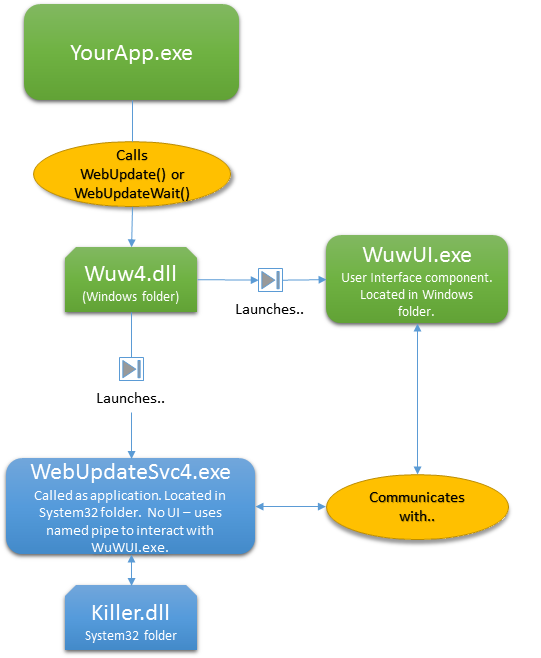
The Software Update Wizard components work cooperatively in application mode, as
shown in the following diagram:
Therefore,
- As with the service implementation, your application
calls one of the exported functions from wuw4.dll. However, this time
you append the text "[AsApp]" to the URL argument - for example
WebUpdate("http://www.mycompany.com/updates/updatescript.txt[AsApp]")
- Wuw4.dll then launches WuWUI.exe, the user interface
component. It also launches WebUpdateSvc4.exe,
passing it the URL of the update script as a command line argument. Because
WebUpdateSvc4.exe is launched as an application it is limited to operating within
the security context of the logged on user.
- WebUpdateSvc4.exe starts up and takes over control of the update process.
Wuw4.dll returns control to your application.
- If WebUpdateSvc4.exe determines that an update is required it works cooperatively
with the user interface component (WuWUI.exe) to process it.
- Once the update has been processed, WebUpdateSvc4.exe tells WuWUI.exe to
exit and then exits itself.
- If no update is required then the WebUpdateSvc4.exe component tells WuWUI.exe
to exit, no user interaction occurs, (unless you specify a
block [99999] message section
in your update script) and WebUpdateSvc4.exe itself then executes.
If you find it easier to launch a process from your application than using an
exported function in wuw4.dll you can, instead, launch our wuwstub.exe utility,
passing it the url of your update script as a command line argument. Using
the Windows
ShellExecute() API from your application, you would launch wuwstub.exe like
this:
ShellExecute(NULL,
"open",
"wuwstub.exe",
"http://www.mycompany.com/updates/updatescript.txt[AsApp]",
NULL,
SW_HIDE);
Wuwstub.exe is dynamically linked to wuw4.dll. Therefore when you call
wuwstub.exe using ShellExecute() from your application, wuwstub.exe effectively
becomes 'YourApp.exe" in the diagram above.
You can either locate the Software Update Wizard components in the
locations show in the diagram above, or alternatively they can all be stored in
your application folder. Therefore, in addition to your application files,
you should install the following Software Update Wizard files into your
application folder:
- WebUpdateSvc4.exe
- WuWUI.exe
- WuW4.dll 4
- WebUpdateSvc4.LIC
Summary
This topic has explained the architecture differences between running the
Software
Update Wizard as a service application and running it as a Windows application in
application mode.
The advantage of running in application mode is that the Software Update Wizard
imposes no memory overhead, except when it is processing an update.
The advantage of running as a service is that updates take place in the SYSTEM
security context - i.e. as if an Administrator was driving the machine. The
disadvantage is that the service application imposes a permanent memory overhead
of 2.5Mb to 5Mb ('Private Bytes'). In context, that memory overhead
represents just 0.00000006% to 0.00000012% of a 4GB machine's memory. In
addition, the CPU usage whilst the service is not actually processing an update
request is negligible
In the past application mode was preferred by many for the memory saving.
However, although you are still free to use this mode, the restrictions and additional
security settings implemented in Windows Vista forwards and in corporate XP deployments makes
application mode very much a thing of the past.
Ultimately, any update component that successfully updates software components in
protected folders needs to be implemented as a service to remain compatible with
Windows Vista and its successors.