Deploying the Software Update Wizard
As discussed in the Software Update Wizard architecture
page, you can deploy the Software Update Wizard as a Windows Service, or as a standard
Windows executable.
Both implementations have the same functionality, with the exception that when
the Software Update Wizard runs as a Service it runs in the SYSTEM security context,
and therefore has rights equivalent to Administrator rights to update any files
on the host computer, even files which the logged on user does not have rights to
change. For 'modern' operating systems like from XP, Vista, Windows 7
and forwards, the service
implementation should be the preferred option as it allows you to securely deploy
the full range of Software Update Wizard features for a negligible memory overhead
and virtually zero cpu utilization (except during the actual update process itself).
The easiest deployment option - use our supplied redistributable installer,
wuwinstaller.exe
Installing using wuwinstaller.exe:
The easiest way to deploy the Software Update Wizard is with the supplied wuwinstaller.exe,
which is located in the 'SoftwareUpdateWizard' folder under 'Program Files on your
computer.
You can launch this installer from within your own application installer.
You can force it to run silently (i.e. with no user interface) by passing the text
"/S" as a command line argument, as in:
wuwinstaller.exe /S
Note that the "S" must be upper case.
There are three additional command line
options you can use:
| -NoInstall
1 |
Tells the installer not to install the service application
into the services database in Windows using the SYSTEM identity default.
This option is described in more detail below. |
| -HideUninstall
1 |
Tells the installer not to add uninstall information to the Windows
'Add/Remove Programs' control panel applet. Note that the uninstaller
executable will still be installed, and must be called by your uninstaller
as described here. |
| -Terminate
1 |
This option is provided to allow you to choose between two
alternatives when running wuwinstaller.exe from a Software Update Wizard
script ExecAfter or
ExecBefore and addresses
the issues stemming from the updater updating itself.
Alternative 1
The '-Terminate 1' command
line option causes the installer to immediately terminate the existing
instance of the Software Update Wizard service, WebUpdateSvc4.exe,
allowing it to be updated and restarted. The Software Update
Wizard is always reliably updated immediately.
Please note,
however, that any update sections within the current update script that
follow the section containing the
wuwinstaller.exe launch will not be
processed within that update check. Next time an update check is
made the section containing the wuwinstaller.exe launch will be ignored
(because the Software Update Wizard is up to date) and the following
sections within the update script will be processed as normal.
Alternative 2
If the '-Terminate 1'
command line option is omitted, the installer uses the Software Update
Wizard service's command line parameter, "-e', to stop the Software
Update Wizard service.
However, if the Software Update
Wizard service does not shut down quickly enough, it cannot be
immediately updated and restarted.
In this eventuality the
installer sets up a 'replace on reboot' registry entry. The
existing update script will continue to be parsed and processed by the
existing (i.e. previous) Software Update Wizard version. At
the next reboot the Software Update Wizard service will be replaced with
the updated version installed by wuwinstaller.exe. |
If you use wuwinstaller.exe to deploy the Software Update Wizard then the only other
installation responsibility you have is to install the Software Update Wizard licence
file, WebUpdateSvc4.lic, into the same folder as your application. The developer
installer will have installed WebUpdateSvc4.lic into the 'SoftwareUpdateWizard'
folder within your 'Program Files'.
 More..
In common with most modern installers, wuwinstaller.exe needs to be run by a
user with Administrator rights, because it installs files into the "Windows\System32"
folder and endeavours to install/start a Windows service (the Software Update
Wizard service).
You have already 'seen' wuwinstaller.exe in operation, as the developer installer
used it to install the Software Update Wizard service and core components onto
your computer.
Wuwinstaller.exe contains the following core Software Update Wizard components::
- WebUpdateSvc4.exe - the Software Update Wizard service application
--> installed to System32 or equivalent on 64 bit systems.
- WuWUI.exe - the Software Update Wizard User Interface (UI) component
--> installed to Windows folder
- wuw4.dll - the Software Update Wizard dll, whose exported functions
your application calls to initiate update checks --> installed to
Windows.
- wuwuninst.exe - uninstaller program for the Software Update Wizard redistributable
--> installed to System32 or equivalent on 64 bit systems.
In addition, wuwinstaller.exe installs and starts the Software Update Wizard
service application, which you can verify via the services.msc applet.
To uninstall the core components on a client machine your uninstaller should
call 'wuwuninst.exe', which the installer installed into the user's 'System32' folder.
As with wuwinstaller.exe, appending "/S" to the command line causes wuwinstaller.exe
to work with no user interface, as in:
wuwuninst.exe /S
Note that the "S" must be upper case.
More..
The wuwinstaller.exe redistributable takes care of shared file counting.
In other words, each time wuwinstaller.exe is run it creates/increments a shared
file counter in the Windows registry. Each time wuwuninst.exe is run the
shared counter is decremented. When it reaches zero the shared files are
removed. The registry key which contains the counter is:
HKEY_LOCAL_MACHINE\SOFTWARE\Software Update Wizard\InstallCount
We recommend that you use wuwinstaller.exe to deploy the Software Update
Wizard because it removes your responsibility for installing and starting the
service and ensuring that uninstalling your application does not interfere with
other applications which depend on the Software Update Wizard for automatic
updates. It adds only 275Kb of overhead to your installer.
If you decide to 'roll your own' installer then you will have to address
all of the issues outlined above - i.e.:
- Install and start the service on installation
- Ensure when you uninstall your app it does not uninstall the Software
Update Wizard unless no other applications depend on it
- Stop and uninstall the service from Windows
Tips for InstallShield users
Set up a Custom Action to "launch executable", from Binary Table, point to the
wuwinstaller.exe, use /S if a silent install of the Software Update Wizard is required.
It can be put at the end of Install Exec sequence. Set its condition to 'Not Installed'.
For the uninstall, set up a Custom Action to "launch executable", from Directory,
point to [Windows System]\wuwuninst.exe, use /S if desired, put at the end of the
Install Exec sequence after the previous custom action. Set its condition to 'REMOVE="ALL"'.
Putting both these actions at the end of the Install Exec sequence works fine.
When you use InstallShield to build a single executable (setup.exe) for the install,
it must be run As Administrator on Vista forwards, in order for the custom actions to work;
otherwise you will get an Error 1721 - it cannot launch the executable. If you build
a One-Click install, where it gives you a .cab file and creates an install.html
with an Install button for you, it seems you don't have to run it as Admin on Vista
forwards in order for the custom actions to work.
Important: The Software Update Wizard licence file, WebUpdateSvc4.lic
must be installed into the same folder as your application runs from, otherwise
the Software Update Wizard will not find it.
However, some deployments involve
running the Software Update Wizard on a networked (LAN-based) client computer where
the application files to update are located on a server. The client machine
launches the application using a shortcut pointing to the networked location of
the application executable. Installing the licence file in the application
folder on the server will not work in a default Software Update Wizard installation
because the service runs in the SYSTEM security context and SYSTEM does not (by
default) have access to network drives. To allow the Software Update Wizard
to work in this situation you should, instead, install the licence file into
the same folder as WebUpdateSvc4.exe is running from on the local machine - i.e.
the Windows system folder (usually C:\Windows\System ).
Important: This solution will only pass the licence file check
if the running application is located on a network drive. To update applications
located on the local machine the licence file must be located in the application
folder.
More..
However, if you really need to locate the licence file in a different folder,
you may do so, and then pass the folder within the WebUpdate() or WebUpdateWait()
URL, as shown here:
WebUpdate("http://www.mycompany.com/updatescript.txt|c:\Program
Files\MyApp\LicenceFolder\");The folder path is appended to the
update script URL and separated with a '|' character (ASCII character decimal
124 / hex 7C).
However - please note that if you use this option
the following changes to other Software Update Wizard behaviour will apply:
- the default update folder (i.e. if you do not use a
TargetFolder keyword) will
be the folder you specified for the licence file.
- The <CLIENTFOLDER>
folder substitution variable will return the folder you specified for the licence
file.
- If you use language files then the
Software Update Wizard will look for them in the same location as the
licence file.
Therefore, unless you have a compelling reason to deviate, we strongly
recommend that you install WebUpdateSvc4.lic into the folder of your running
application.
See also: Software Update Wizard Service Reference
for information on start-up parameters for the Windows Service implementation of
the Software Update Wizard. However, If you use wuwinstaller.exe you do not
need to know this information unless you want to install the service application
in a different security context to SYSTEM.
Running the Service under an
alternate security context..
If you want to install the Software Update Wizard service to run in a different
security context to the default then you can use wuwinstaller.exe the following
command line arguments:
wuwinstaller
-NoInstall 1
... or for a silent installer:
wuwinstaller /S -NoInstall 1
This causes the files to be installed to the hard disc, but the service application
will not be registered as a windows service. You can then use the WebUpdateSvc4.exe
command line options to install and start the service,
as described here.
Please bear in mind that he default local security policy on most Windows platforms
prevents users from registering and starting a service application. Therefore
this policy must be adjusted for the user in who's security context the Software
Update Wizard is to be run from, by adding the user to the policy, as shown in this
screenshot:
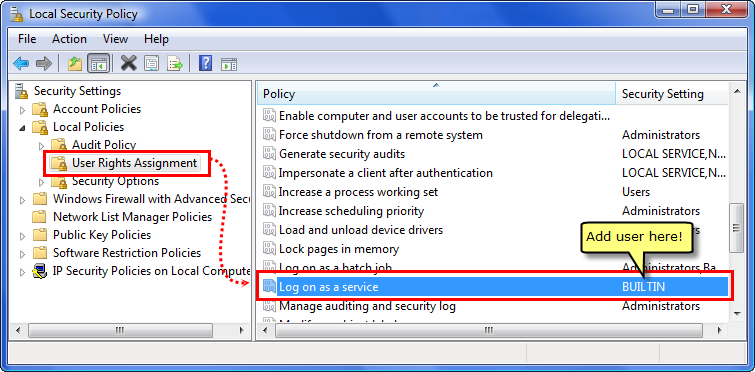
If you do not update this setting then Windows will report a 'logon failure'
when you try to start the service application.
Adding Software Update Wizard to Your Own Installer?
We strongly recommend simply calling wuwinstaller.exe from within your own installer.
As explained above, adding the command line argument "/S" will ensure the installation
is silent and automatic.
Your uninstaller then calls the Software Update Wizard uninstallation program
which wuwinstaller.exe will have installed into the user's System32 folder, 'wuwuninst.exe'.
Nearly every installer maker available allows you to launch additional processes
such as wuwinstaller.exe as part of your installation. Whilst we are happy to provide
the information below, we do recommend using our wuwinstaller.exe, because we have
worked through the inevitable complexity associated with installing/uninstalling
a potentially shared set of files, starting and stopping a Windows service etc..
However, if you are determined to incorporate the Software Update Wizard components
individually into your own installer, this is what you will need to do:
Installation
Uninstallation
- You must decrement the value of the registry counter at
HKEY_LOCAL_MACHINE\Software\Web Update Wizard\InstallCount
and only proceed with the uninstallation if it reaches zero. Otherwise you risk
uninstalling the Software Update Wizard whilst other applications still depend
on it for updates.
- If the counter has reached zero you must stop the service and uninstall
it from Windows services database, using the following command line arguments
to WebUpdateSvc4.exe:
WebUpdateSvc4.exe
-e
WebUpdateSvc4.exe -u
- Then reverse out everything from Installation
as per a normal uninstallation.